A whole week of lunches,
in one order
Daily and weekly menus are built in the same product editor as everything else. Guests choose in advance what they want each day and order the whole week in one go – at a discounted bundle price.

Daily menus on the till
A daily menu system that lives in your till
No separate menu tool: daily menus are products like any other – they just get a date and can be grouped into a weekly bundle.
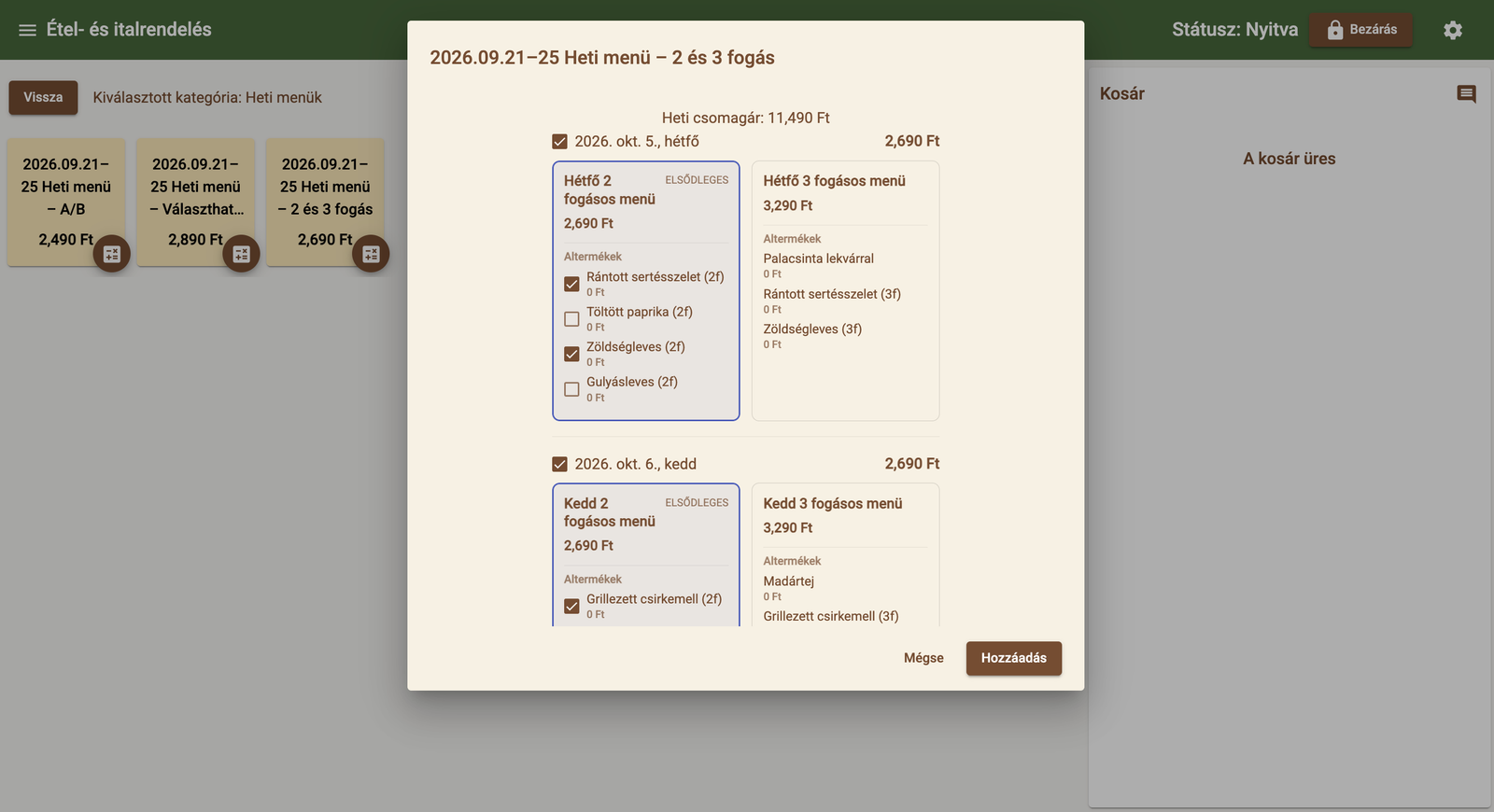
Monday · 2-course menu · 2,690 HUFEvery day’s menu, one tap away
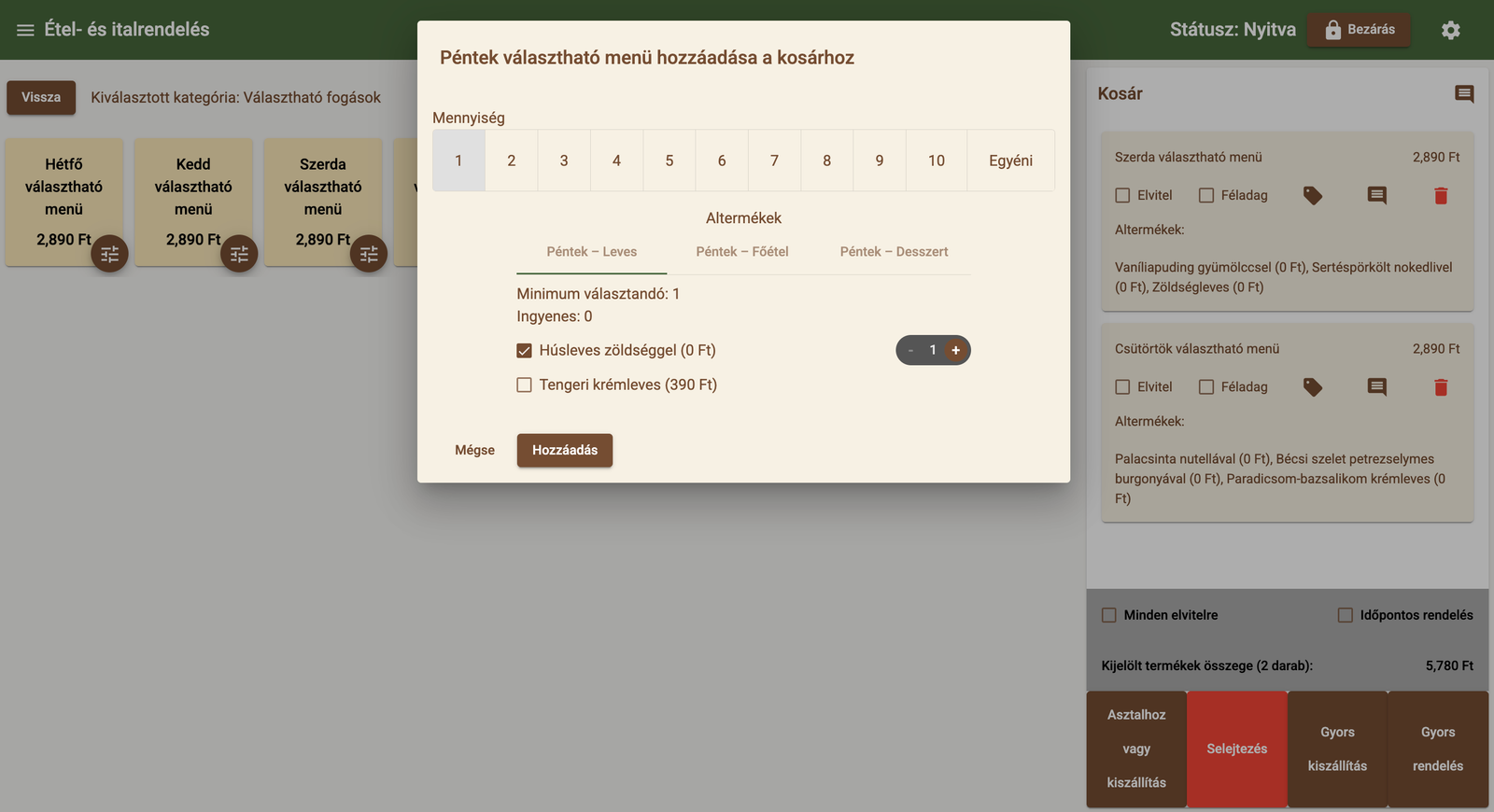
Any product can become a daily menu: give it a day and mark whether it is that day’s primary menu. On the till the week’s menus sit side by side, and the basket shows which soup and main the guest chose.
 Weekly bundle: 11,490 HUFPrimary menu preselected
Days become a weekly bundle
The week comes together in one window: a 2- or 3-course menu per day, soup and main with a tick. The primary menu is preselected, and the bundle price overrides the sum of the daily prices.
 Seafood cream soup · +390 HUF
Soup, main, dessert – as they like
With a choice menu, courses sit on separate tabs with a minimum choice. Courses with a surcharge, like the seafood cream soup, are added to the price automatically.
Guests choose the whole week in advance
Breaded pork on Monday, grilled chicken on Tuesday, pork stew on Wednesday – guests pick the menu day by day and place the whole week in a single order.
Weekly menus with pre-ordering
Guests can choose their lunches for the whole week days in advance, and the restaurant sees ahead how much of what it needs to cook each day.
More about pre-ordersChooses once, and lunch is sorted for the whole week.
Sees quantities in advance, so prep and purchasing can be planned precisely.
What daily and weekly menus include
- Dated daily menus
- Primary menu for a given day
- 2- and 3-course or choice menus
- Weekly bundle with its own price
- Ordering start date
- The whole week as one basket item
Daily and weekly menus: frequently asked questions
How do you set up a daily menu in Orderly?
How can guests order a whole week of menus in advance?
Can you offer 2- or 3-course menus, or a choice of dishes?
Works well together with
- Pre-ordersScheduled orders that appear in the kitchen exactly when it is time to start them.
- Online ordering and QR menuYour own online menu and QR code: counter, table or delivery orders – at just 0.5% commission.
- Order taking and POSColour-coded categories, toppings, half portions, takeaway and discounts – an order in a few taps.
- Kitchen printing and KDSTicket or screen: orders reach the kitchen instantly, and ready dishes are flagged.
Let's talk about how it would work for you
Tell us what kind of venue you run, and we will get back to you with a tailored demo.
Get in touch
- Emailinfo@orderly.hu
- Phone+36 30 644 7805